¶ Audit Evidence
Detection → Audit evidence is the live view of the Defend-O-Tron’s tamper-evident record: what it saw, what it decided, and what people did on it. Use it to check that the record is whole, and to look up recent events. To hand evidence to an auditor, export an evidence pack with defend-audit report. See Compliance Reporting.
You need the Audit log permission to open the page. Administrators have it. The built-in viewer role does not, unless an administrator gives it to that role.
The page has three tabs: Summary, Records and Admin actions.
¶ How the record is kept
- Each Suricata event and each CrowdSec decision is added to a hash chain as it is stored. The hash of each row includes the hash of the row before it, so a changed or deleted row breaks the chain.
- Shortly after midnight each day, the device writes a manifest. It lists a SHA-256 hash of each log file and the newest link of each chain, and the device signs it with its own Ed25519 key. A trusted timestamp (RFC 3161) from an outside time-stamping service proves when it was signed.
- Each hour, a self-check verifies the signed manifests and the newest part of each chain again, and reports the result on this page.
The audit store keeps events, decisions and admin actions for 365 days.
¶ Summary
Choose the period at the top, from the Last hour to the Last 30 days (24 hours by default). The period applies to the Recorded totals and charts only. The integrity result and the hash chains are always the newest.
The page reloads its data at the Auto refresh interval in the user menu (every minute unless you change it). Click Refresh to read it at once. See The user menu.
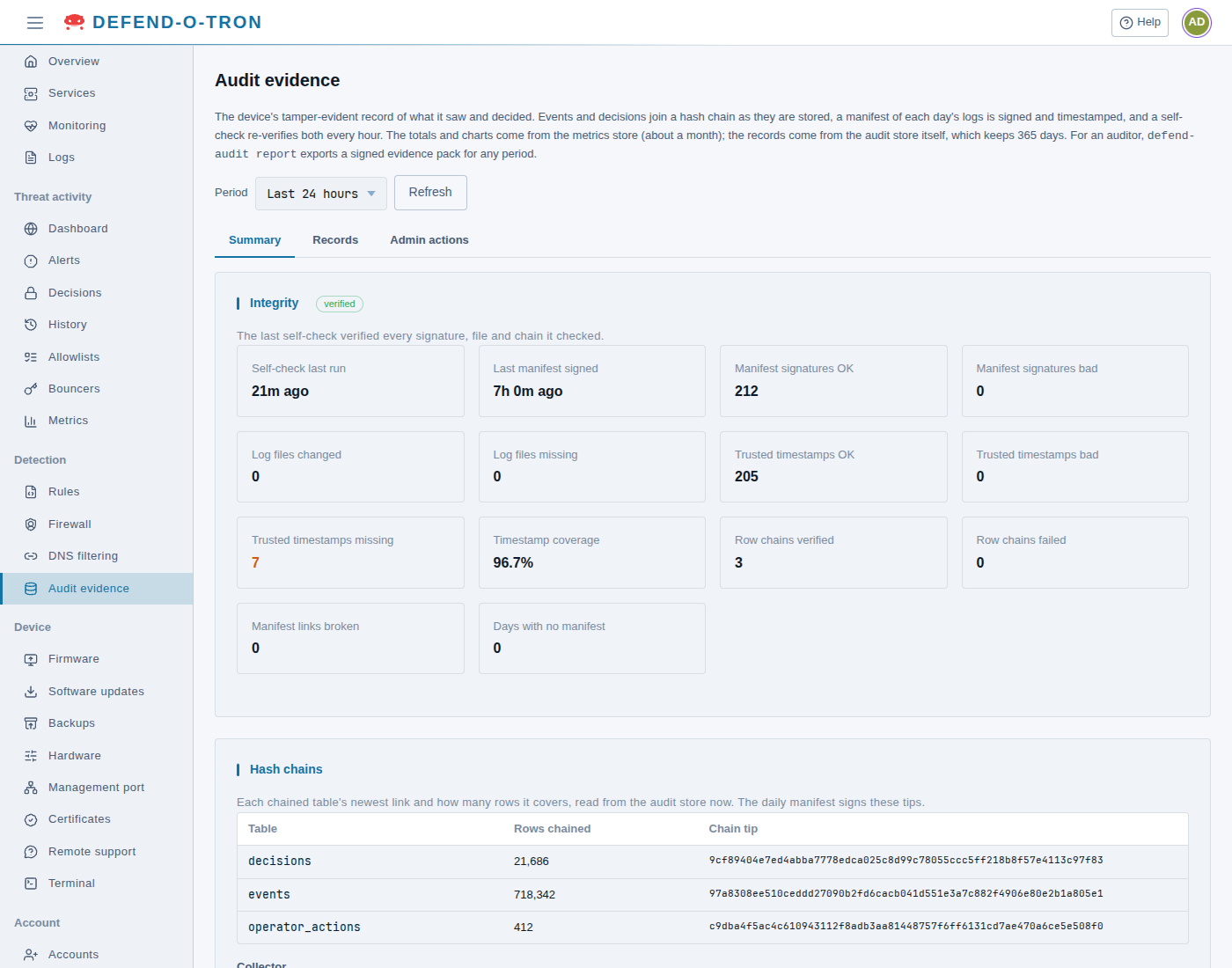
¶ Integrity
The result of the last hourly self-check. The label next to the title says:
- verified: The last self-check verified every signature, file and chain it checked.
- problems found: The last self-check found records or signatures that did not verify. A bad signature, a changed log file, a failed chain, a broken link or a bad timestamp was found.
- no self-check result: The hourly self-check has not reported yet. This is normal for up to an hour after the device starts for the first time.
| Figure | What it tells you |
|---|---|
| Self-check last run | How long ago the self-check ran. More than an hour means it did not run |
| Last manifest signed | How long ago the newest daily manifest was signed. More than a day means a manifest is late |
| Manifest signatures OK, bad | Manifests whose signature verified, or failed. Bad must be 0 |
| Log files changed, missing | Log files whose hash no longer matches their manifest, or that are gone. By default the hourly self-check does not hash the log files again, so these stay at 0. defend-audit verify checks them. See defend-audit verify |
| Trusted timestamps OK, bad, missing | Manifests whose timestamp verified, failed, or is not there yet. Bad must be 0 |
| Timestamp coverage | The share of signed manifests that have a verified timestamp |
| Row chains verified, failed | The chained tables whose newest rows verified (the newest 5,000 rows of each table), or failed. Failed must be 0 |
| Manifest links broken | Manifests whose signed link to the previous day’s manifest does not resolve: a manifest is gone or changed. Must be 0 |
| Days with no manifest | Days between the first and the newest manifest that have no manifest. A day when the device was off has none, so this is not a tamper signal by itself, but it is a day with no evidence |
A count of bad, changed, missing or failed items above 0 shows in orange.
If a count that must be 0 is not 0, treat it as possible tampering. Open Device → Terminal and run
sudo defend-audit verify-chainto check every row of every chain, then contact Awesome-O support. See defend-audit verify-chain and Continuous Self-Check.
Trusted timestamps missing goes up when the device could not reach the time-stamping service when it signed. The device tries again every hour, so the count goes down when the service is reachable. A missing timestamp for an old manifest, after it was there before, is different: see Trusted Timestamps.
¶ Hash chains
One row for each chained table, read from the audit store now:
| Table | What it holds |
|---|---|
decisions |
The CrowdSec decisions the device made |
events |
The Suricata alerts |
operator_actions |
The admin actions (see Admin actions) |
Rows chained is how many rows the chain covers. Chain tip is the hash of the newest row. The next daily manifest signs it.
¶ Collector
The program that reads Suricata and CrowdSec into the audit store:
- Schema version: the version of the audit store’s layout.
- CrowdSec first sync: done after the collector has read CrowdSec’s active decisions once. not yet (in orange) means it has not reached CrowdSec yet.
- Suricata read position: how far into Suricata’s log the collector has read.
- Suricata lag: how much of Suricata’s log it has not read yet. It runs once a minute, so a small lag is normal. A lag that keeps growing means it cannot keep up.
- Last tick: how long its last run took.
¶ Recorded
What was recorded in the period you chose, from the device’s metrics store:
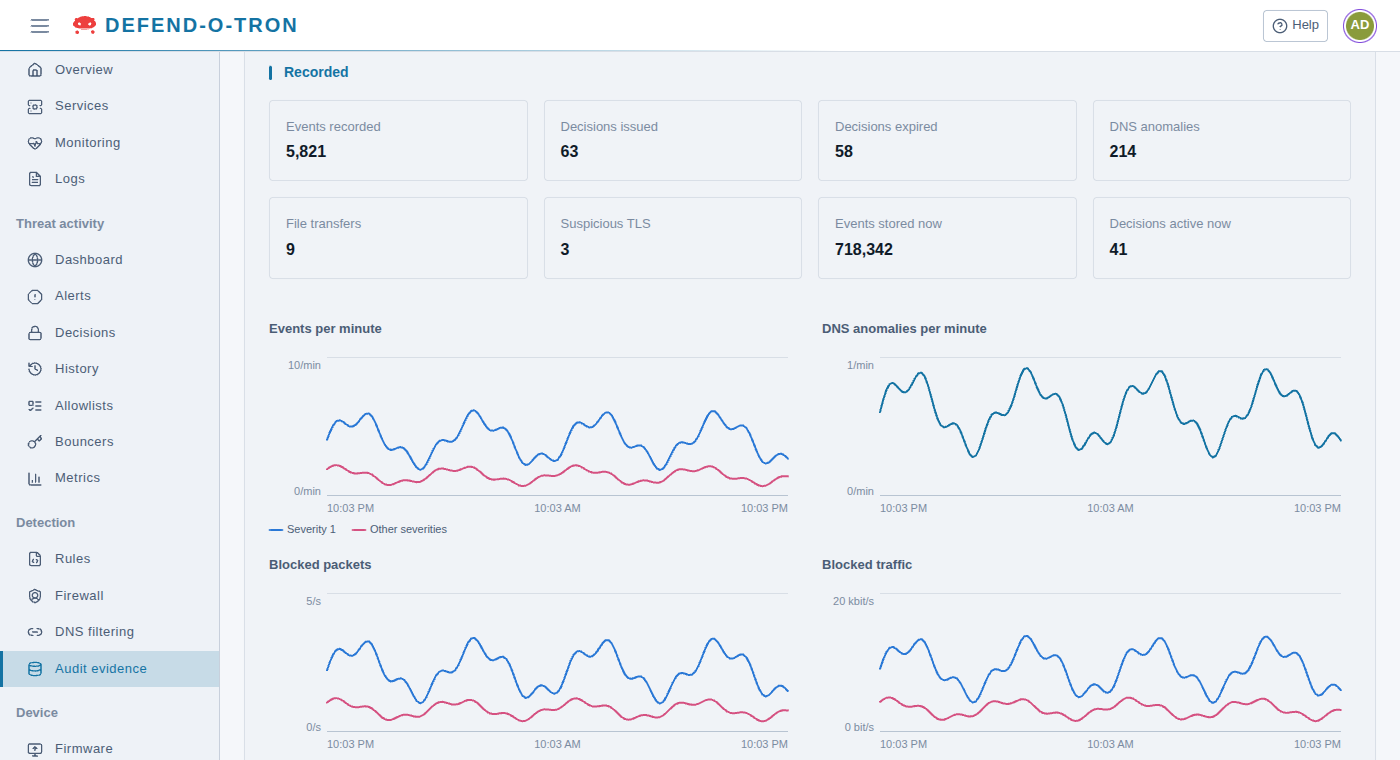
| Figure | What it counts |
|---|---|
| Events recorded | Suricata alerts |
| Decisions issued, expired | CrowdSec decisions that started, or ended |
| DNS anomalies | DNS answers with an error (see Records) |
| File transfers | Files Suricata saw in a transfer |
| Suspicious TLS | Encrypted connections to a server with a self-signed or new certificate |
| Events stored now, Decisions active now | What is in the audit store at this moment, whatever the period |
The charts show Events per minute (severity 1, and the other severities), DNS anomalies per minute, and the packets and traffic the firewall blocked, inbound and outbound.
The metrics store keeps these figures for 90 days on a V100 and 180 days on a V200.
¶ Records
The newest records from the audit store. Choose the list in Show. Each list shows the newest 200, newest first, whatever period you chose on the Summary tab. For older records, export an evidence pack.
| List | What it holds | Columns |
|---|---|---|
| Recent events | Suricata alerts | Time, Source, Destination, Protocol, Signature (with its rule ID), Severity, Action |
| Active decisions | The device’s CrowdSec decisions that have not expired | Time, Address or range, Scope, Scenario, Origin, Type, Expires |
| DNS anomalies | DNS answers with the error codes NXDOMAIN, SERVFAIL or FORMERR | Time, Client, Name, Type, Answer |
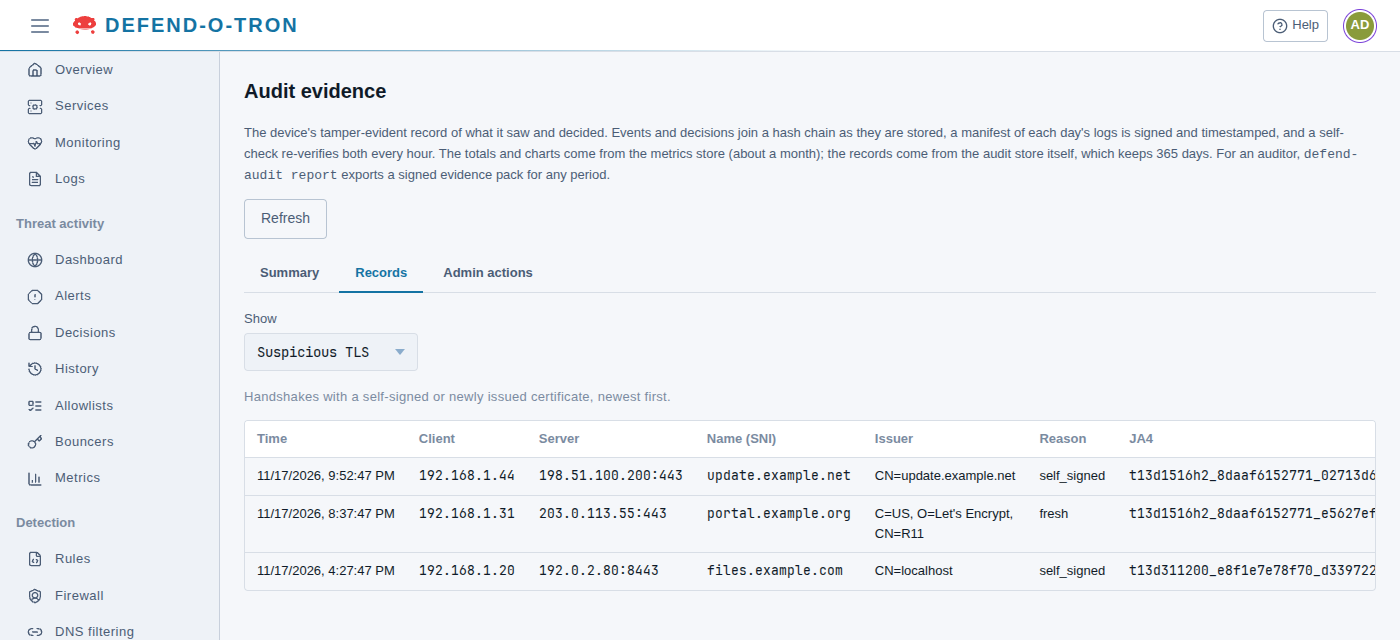
| Suspicious TLS | Encrypted connections to a server whose certificate is self-signed, or was issued in the last 30 days | Time, Client, Server, Name (SNI), Issuer, Reason, JA4 |
| File transfers | Files Suricata saw in a transfer, with their SHA-256 when Suricata computed one | Time, From, To, Protocol, Name, Type, Size, SHA-256 |
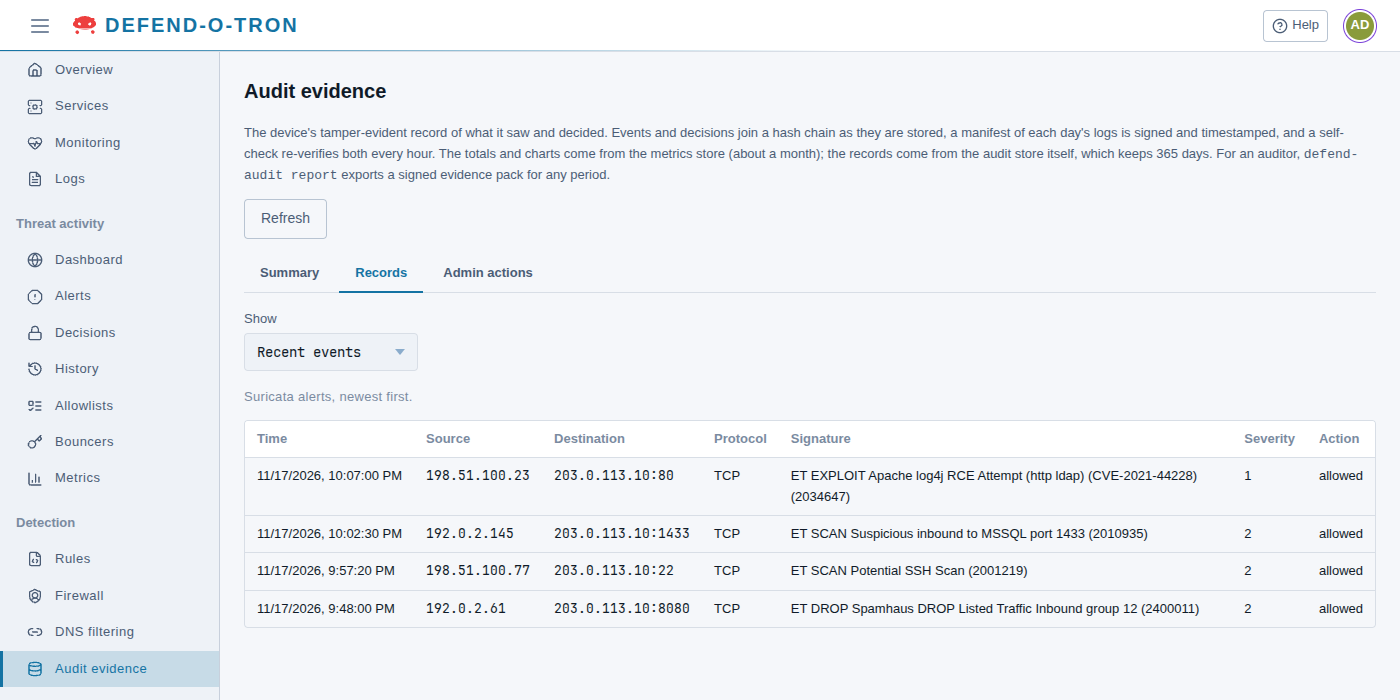
Some things to know:
- Action on an event is allowed. Suricata watches the traffic and does not block it. The block comes from CrowdSec, as a decision. See Decisions.
- Severity 1 is the most serious.
- Active decisions holds the decisions this device made: from its own scenarios (Origin
crowdsec), from a ban made by a person (cscli), or from the CrowdSec Console (console). The community blocklist is not in the audit store. - A failed DNS lookup is often harmless (a mistyped name), but malware that tries many made-up names to find its server makes many of them.
- In Suspicious TLS, Reason is
self_signedorfresh(the certificate was issued in the last 30 days). Many are harmless, such as a printer’s own certificate. A computer that connects to a new, unknown server again and again deserves a look. JA4 is a fingerprint of the program that made the connection. The table scrolls to the side to show it in full.
The records were written by traffic from the internet. Names, signatures and file names can hold anything an attacker chose to send. The page shows them as plain text.
¶ Admin actions
What people did on this device, newest first, including refused sign-ins. Passwords and other secrets are never recorded. The list shows the newest 200.
| Column | What it shows |
|---|---|
| Time | When it happened |
| Who | The user name. For a refused sign-in, this is what was typed |
| From | The address it came from, or device for the device’s own steps |
| Via | Web UI, Command line, Support console, or The device (upgrade) for steps an upgrade ran |
| Action | What was done, for example crowdsec.unban, acl.apply or auth.login |
| Target | What it was done to, for example the address, the list file or the user name |
| Result | ok, or why it failed or was refused (in orange) |
| Details | The settings used, and the reason the person gave, if any |
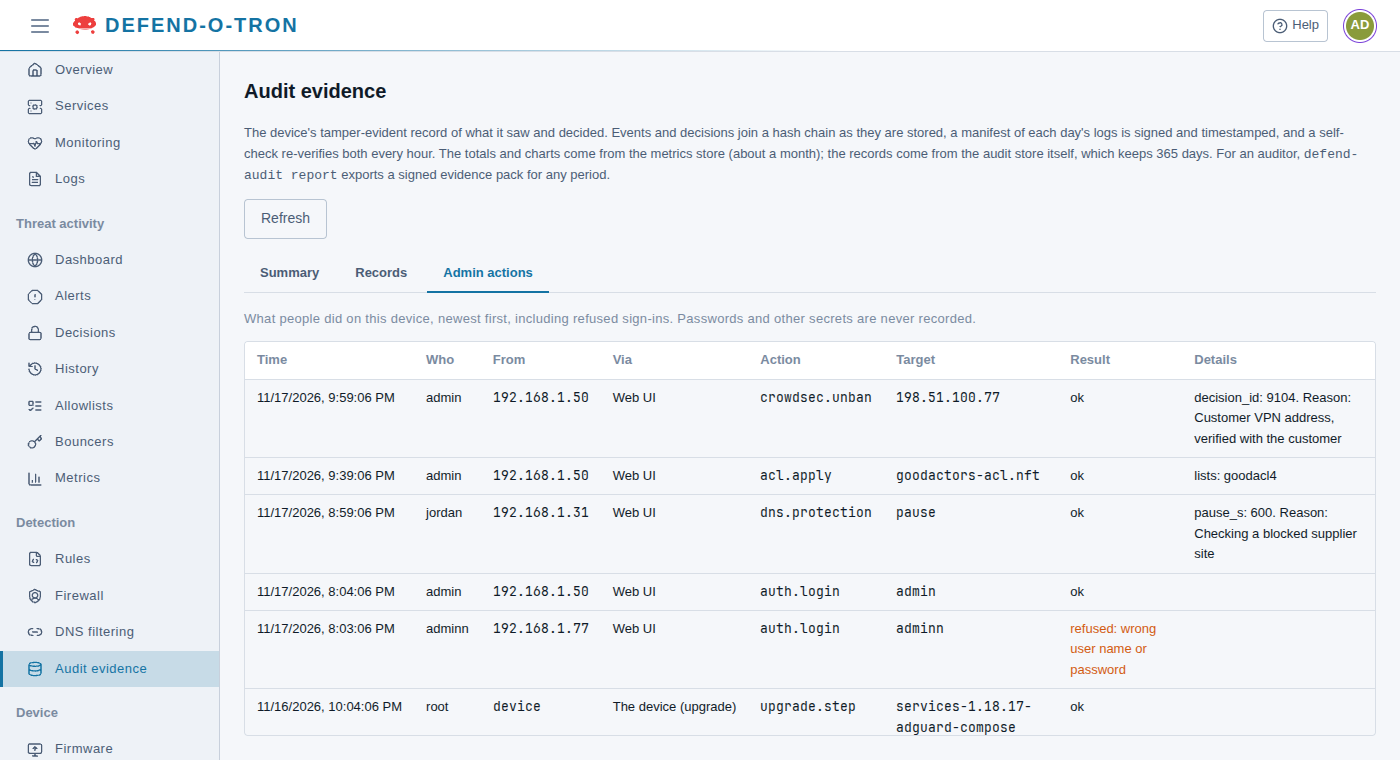
Admin actions are part of the hash chain, so they are as tamper-evident as the events. Pages that ask for a reason, such as an unban, keep it here.
¶ Related
- Compliance Reporting: the evidence pack, verifying it, and how each feature maps to NIS2, NIST CSF and ISO 27001.
- Decisions: CrowdSec’s bans, and unbanning an address.
- Rules: the Suricata rules that make the events.