¶ Log Ingress
Other systems on your network can send their logs to the Defend-O-Tron over syslog. CrowdSec reads them, spots attacks in them (for example repeated failed logins), and bans the attackers on the Defend-O-Tron like any other threat. The device accepts these logs on its management address only.
The Defend-O-Tron is not a log storage or collection server. Send it only security-related logs: logs it does not understand use its storage and slow it down without making anything safer. For a full logging system, consider Graylog, which can filter your logs and forward only the security-related ones to the Defend-O-Tron.
¶ Logs the Defend-O-Tron understands
CrowdSec reads a log only if it has a parser for it. The Defend-O-Tron comes with parsers for:
- Linux systems: system logs and SSH logins.
- Linux firewalls: iptables and nftables logs.
- Web servers and proxies: NGINX and Traefik access logs, including attacks on WordPress sites.
- Routers and gateways: UniFi gateways. For MikroTik routers, the device understands the ban lines from the firewall rules in Send Logs to the Defend-O-Tron (the
add-bannedchain); other MikroTik logs are kept but not understood. - Windows Firewall logs.
- Others: Home Assistant logins, Samba (Windows file sharing) on Linux, and Linux audit logs (auditd).
The device accepts logs from any system, but CrowdSec cannot watch a log it has no parser for. Today that includes pfSense firewall events, Apache and HAProxy logs, and the Windows Security event log. They are received and kept, but they show as unparsed in Log sources (see below).
¶ Adding a parser
If you send logs the Defend-O-Tron does not understand yet, you can add CrowdSec’s parsers for them yourself. CrowdSec groups parsers and their scenarios into collections, listed in the CrowdSec Hub. For example:
| Logs from | Collection |
|---|---|
| pfSense (firewall events) | crowdsecurity/pfsense |
| Apache web server | crowdsecurity/apache2 |
| HAProxy | crowdsecurity/haproxy |
| Windows (Security event log) | crowdsecurity/windows |
In Device → Terminal, install the collection, then restart CrowdSec so it loads it:
sudo cscli collections install crowdsecurity/pfsense
sudo do-stacks recreate crowdsec
Check that it is installed with sudo cscli collections list. The collection stays installed when the device restarts or updates. To remove it again, run sudo cscli collections remove crowdsecurity/pfsense, then sudo do-stacks recreate crowdsec.
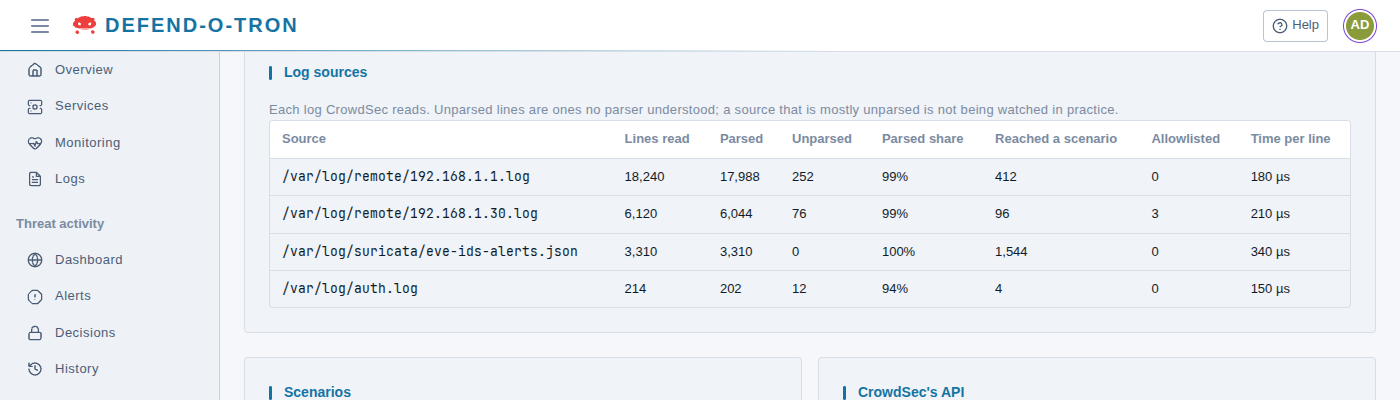
A parser understands one log format. Logs sent over syslog by another tool (for example Windows events sent through NXLog) may not match the format the parser expects. After you add a collection, check Log sources (below): the system’s Parsed count should rise. If its lines stay unparsed, the collection does not fit that log.
To keep the Defend-O-Tron fast, send logs from no more than one to four systems.
¶ How to send logs
The step-by-step guide, with screenshots, is Send Logs to the Defend-O-Tron. It covers Linux, Docker, Windows, NGINX, MikroTik, pfSense and UniFi, and shows how to check that the logs are arriving.
In short:
- The Defend-O-Tron listens for syslog on port 514, over UDP or TCP, on its management address only.
- The sending system’s address must be allowed on Detection → Firewall, under Management access: in both Management networks and Management allowed addresses. See Management access.
- Each sending system’s logs are kept in a file of their own, named after its address (
/var/log/remote/<address>.log), for 180 days. Each day’s log is compressed, and the oldest is deleted.
¶ Checking what CrowdSec understood
Open Threat activity → Metrics and find the Log sources card (see Metrics). It lists each log CrowdSec reads: the lines read, how many it understood (Parsed) and did not (Unparsed), and how many reached a scenario. A source that is mostly unparsed is not being watched in practice: check that it is one of the logs listed above.
¶ Related Pages
- Send Logs to the Defend-O-Tron: the step-by-step guide.
- CrowdSec API: connect the same systems as bouncers, so they also block the attackers themselves.
- Compliance Reporting: the alerts and bans CrowdSec makes from these logs are kept in the tamper-evident audit record.