Advanced — back up before editing. This page covers low-level customization of the honeypot. Incorrect rules can disable your firewall, break the IDS pipeline, or leave the device in an unbootable state. Always back up the files you're modifying and verify the resulting ruleset with
sudo nft list rulesetbefore rebooting.
¶ Packet Flow Reference
The honeypot operates inside the Linux Netfilter (NFT) kernel framework, hooked into the AF_PACKET TAP for raw-level inspection. Understanding the packet flow helps when reasoning about where the honeypot fits relative to the deep-packet IDS (Suricata + CrowdSec) and the rest of the firewall ruleset.
¶ NF Hooks Flow
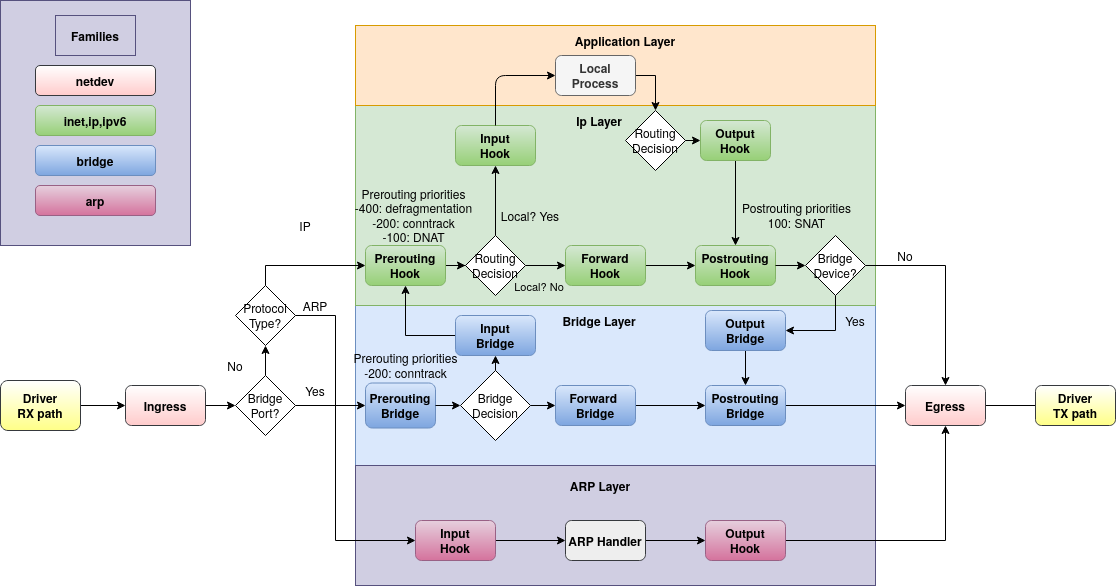
¶ Detailed Netfilter Packet Flow
The IDS hooks into the AF_PACKET TAP built into the Linux kernel to read packets on a RAW level, avoiding heavy interference with intended traffic (5-10ms delay on average).
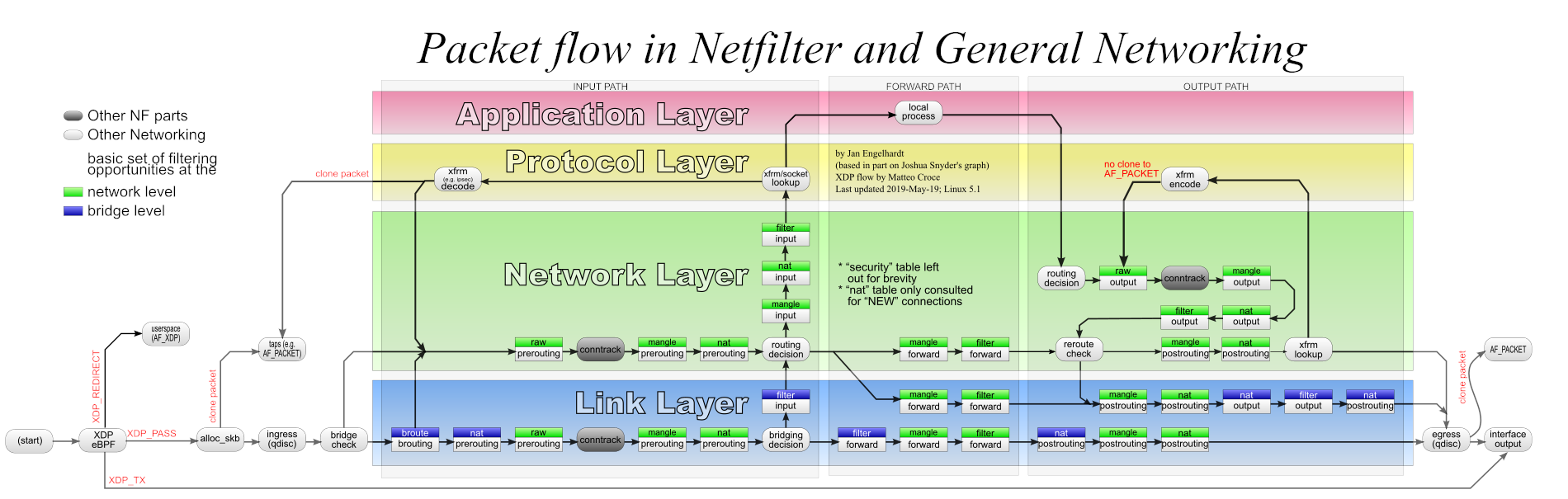
Source: thermalcircle.de
You can read more on honeypots at Wikipedia and the Linux Netfilter project.
¶ Editing the NFT ACL Files
There are three ACL files that control the honeypot. You can safely modify any of them; the structure of the honeypot's NFT rules themselves shouldn't normally need to be touched.
- /etc/nftables.d/honeypot-acl.nft — TCP and UDP port lists, plus the permanent ban-exempt IPv4/IPv6 addresses.
- /etc/nftables.d/goodactors-acl.nft — IPv4 and IPv6 addresses the honeypot will never ban (overrides everything else).
- /etc/nftables.d/badactors-acl.nft — IPv4 and IPv6 addresses the honeypot will always ban.
Editing any of these files requires a reboot to take effect — the rules are loaded at boot, and changes don't apply to a running ruleset.
If you operate an internet-exposed service that uses a port in the default ACL list (for example, SMTP on TCP 25), remove that port from the list before deploying. Otherwise, legitimate inbound connections will be blocked. HINT: it is more secure to run SMTP over TLS on port 465 (SMTPS) or port 587 (submission), neither of which is in the honeypot list.
~$ sudo nano /etc/nftables.d/honeypot-acl.nft
# Trusted Hosts (Never banned)
# Cloudflare DNS, Google DNS, Quad9
define banexempt4={ 1.1.1.1, 1.0.0.1, 8.8.8.8, 8.8.4.4, 9.9.9.9 }
define banexempt6={ 2606:4700:4700::1111, 2606:4700:4700::1001, 2607:f8b0:400a:80b::2003, 2620:fe::10 }

# Scanned ports used in honeypot blocking
# TCP Most Common Ports
define tcp-scanports={ 20-21, 22, 23, 25, 445, 1433-1434, 3128, 3306, 3389, 5985-5986, 8291 }

# UDP Most Common Ports
define udp-scanports={ 69, 135-139, 161 }
~$ sudo nano /etc/nftables.d/goodactors-acl.nft
# Allowed Lists (Good actors)
#
# IPv4
# Most Common Routers
define goodacl4 = { 192.168.0.0/16 }

# IPv6
# Link Local addresses
define goodacl6 = { fe80::/10 }
~$ sudo nano /etc/nftables.d/badactors-acl.nft
# Block Lists
# Addresses that are always blocked (Bad actors)
#
# IPv4 Bad actors
define badacl4 = { 10.10.10.10 }

# IPv6 Bad actors
define badacl6 = { f000::/64 }
The honeypot rule file itself isn't intended for user editing — it's shipped by awesome-o-base and overwritten on package upgrade. Included here for reference:
#!/usr/sbin/nft -f
# Copyright (c) 2024 Awesome-O Gadgets.
#
# Honeypot: Logs connection attempts to
# specific ports which Crowdsec parses.
# Ulogd2 group 2 is for honeypot logs.
# See: /etc/ulogd.conf
#
# Use the honeypots-acl.nft to control which
# ports are considered bad.
#
table inet honeypot {
        # ACL's
        include "/etc/nftables.d/honeypot-acl.nft"
        # ACL Sets
        include "/etc/nftables.d/goodactors.nft"
        include "/etc/nftables.d/badactors.nft"

        set banned-exempt4 {
                type ipv4_addr;
                flags interval, timeout;
                auto-merge
                elements=$banexempt4
        }

        set banned-exempt6 {
                type ipv6_addr;
                flags interval, timeout;
                auto-merge
                elements=$banexempt6
        }

        # Scanned ports used in honeypot blocking
        # TCP Common Ports
        set tcp-scan-ports {
                type inet_service;
                flags interval;
                elements=$tcp-scanports
        }

        # UDP Common Ports
        set udp-scan-ports {
                type inet_service;
                flags interval;
                elements=$udp-scanports
        }

        # Checks on the prerouting hook
        chain honeypot {
                type filter hook ingress devices={ $NIC_INGRESS } priority mangle;
                counter
                meta nfproto vmap { ipv4: jump honeypot-ip4, ipv6: jump honeypot-ip6 }
        }

        # IPv4
        chain honeypot-ip4 {
                counter
                ct state { untracked } ip saddr != @banned-exempt4 counter jump check-banned-ip4
                ip saddr != @banned-exempt4 counter jump check-banned-ip4
        }

        chain check-banned-ip4 {
                tcp dport @tcp-scan-ports counter log prefix "TCP4 honeypot:" group 2 limit rate 12/minute
                udp dport @udp-scan-ports counter log prefix "UDP4 honeypot:" group 2 limit rate 12/minute
                return
        }

        # IPv6
        chain honeypot-ip6 {
                counter
                ct state { untracked } ip6 saddr != @banned-exempt6 counter jump check-banned-ip6
                ip6 saddr != @banned-exempt6 counter jump check-banned-ip6
        }

        chain check-banned-ip6 {
                tcp dport @tcp-scan-ports counter log prefix "TCP6 honeypot:" group 2 limit rate 12/minute
                udp dport @udp-scan-ports counter log prefix "UDP6 honeypot:" group 2 limit rate 12/minute
                return
        }
}
¶ Editing the CrowdSec Parser and Scenario
The CrowdSec parser turns raw honeypot log lines into structured events; the scenario decides when an offender has crossed the line and a decision should be issued. Both live in mounted volumes on the CrowdSec container.
You should only attempt this if you have a good knowledge of REGEX, GROK, and CrowdSec parsers and scenarios. Edit at your own risk. Always back up the original files and test your edits first. CrowdSec has a built-in testing utility for parsers and scenarios — see cscli explain.
The two files:
/opt/deploy/crowdsec/config/parsers/honeypot-ban.yaml/opt/deploy/crowdsec/config/scenarios/honeypot-bf.yaml
Editing either of these files requires a restart of the CrowdSec container to take effect.
¶ Restarting the CrowdSec container
admin@defend-o-tron:~$ sudo do-stacks rm crowdsec
[Container gets stopped]
admin@defend-o-tron:~$ sudo do-stacks
~$ sudo nano /opt/deploy/crowdsec/config/parsers/honeypot-ban.yaml
name: awesome-o/honeypot-banlog
description: "Parses inbound ban logs from the honeypot mangle rules"
author: "Awesome-O Gadgets"
format: 2.0
debug: false
filter: "evt.Parsed.message contains 'honeypot'"
onsuccess: next_stage
pattern_syntax:
  TSTAMP: '%{TIMESTAMP_ISO8601:timestamp}'
  HOSTNAME: '%{WORD:log_host}'
  HONEY_MAC: 'MAC=%{MAC:srcmac}:%{DATA}:%{MAC:dstmac}:%{DATA}'
  HONEY_BAN_BASE_LOG: '%{WORD:ban_type} honeypot: IN=%{WORD:iface} OUT=?(%{DATA:iface_out}) %{HONEY_MAC} SRC=%{IP:src_ip} DST=%{IP:dst_ip} LEN=%{DATA:len} %{GREEDYDATA} PROTO=%{WORD>
nodes:
  - grok:
      apply_on: message
      pattern: '%{HONEY_BAN_BASE_LOG} URGP'
      statics:
        - meta: log_type
          value: honeypot
  - grok:
      apply_on: message
      pattern: ': %{HONEY_BAN_BASE_LOG} SEQ=%{INT:seq}'
      statics:
        - meta: log_type
          value: honeypot

statics:
  - meta: service
    value: honeypot_banlog
  - meta: state_type
    expression: evt.Parsed.state
  - meta: log_host
    expression: evt.Meta.machine
  - meta: ban_type
    expression: evt.Parsed.ban_type
  - meta: ban_protocol
    expression: evt.Parsed.proto
  - meta: ban_port
~$ sudo nano /opt/deploy/crowdsec/config/scenarios/honeypot-bf.yaml
type: trigger
name: awesome-o/honeypot-bf
description: "Detect bruteforce connection attempts from honeypot mangle rules"
author: 'Awesome-O Gadgets'
version: '1.0'
format: 2.0
debug: false
filter: |
    (evt.Meta.log_type == 'honeypot' and evt.Meta.service == 'honeypot_banlog')
distinct: evt.Meta.ban_type
groupby: "evt.Meta.source_ip + '-' + Lower(evt.Meta.ban_protocol + '-' + evt.Meta.ban_type)"
blackhole: 1m
labels:
  behavior: "generic:bruteforce"
  label: "Honeypot bruteforce scan"
  confidence: 3
  spoofable: 0
  classification:
    - attack.T1595
    - attack.T1110
  service: honeypot-bf
  type: bruteforce
  remediation: true
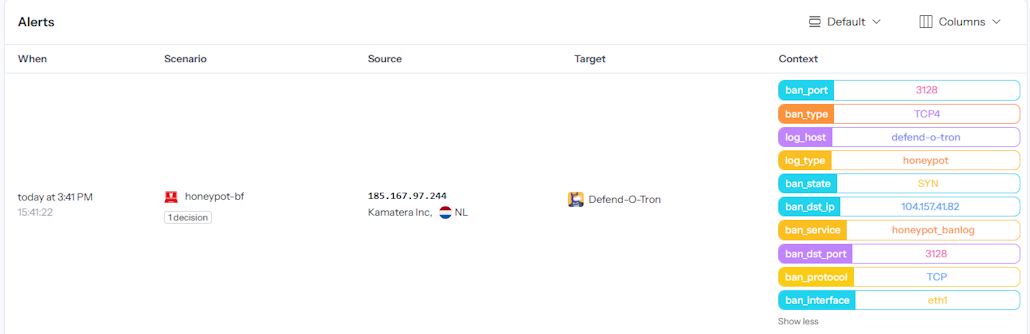
¶ Honeypot Context Data
The column on the right shows the metadata added from the honeypot rules, as seen on the Crowdsec App dashboard.
¶ Regex and GROK Reference
¶ Regular Expressions (Regex)
Regular Expressions (regex / regexp) are extremely powerful for searching and manipulating text strings — a single regex line can easily replace dozens of lines of procedural code. The language takes time to master and can cause serious side effects when used carelessly (notable real-world example).
¶ GROK
GROK is a regex dialect that supports reusable aliased patterns. GROK works particularly well with syslog logs, Apache and other webserver logs, MySQL logs, and any log format written for humans rather than computers. CrowdSec uses GROK throughout its parser library — including the honeypot parser shown above.
¶ Related Pages
- Honeypot — user-facing overview of what the honeypot does and how to handle false positives.
- External Log Ingress — the syslog architecture that feeds CrowdSec.
- CrowdSec API — remote bouncer setup using the same threat decisions the honeypot produces.