Advanced — back up before editing. This page covers low-level customization of the honeypot. Incorrect rules can disable your firewall, break the IDS pipeline, or leave the device in an unbootable state. Always back up the files you’re modifying and verify the resulting ruleset with
sudo nft list rulesetbefore rebooting.
¶ Packet Flow Reference
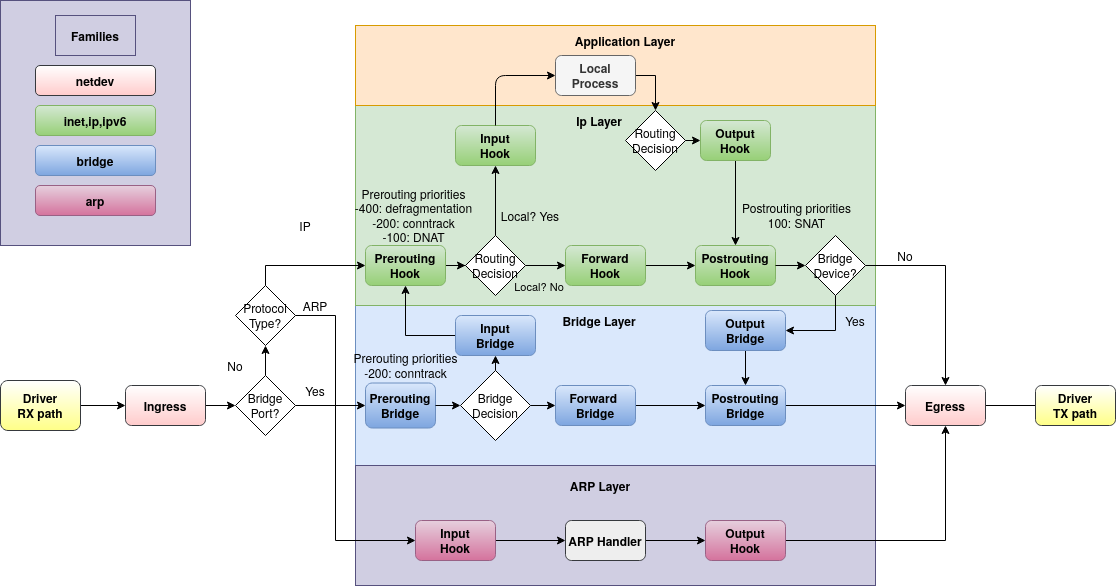
The honeypot operates inside the Linux Netfilter (NFT) kernel framework, hooked into the AF_PACKET TAP for raw-level inspection. Understanding the packet flow helps when reasoning about where the honeypot fits relative to the deep-packet IDS (Suricata + CrowdSec) and the rest of the firewall ruleset.
¶ NF Hooks Flow
¶ Detailed Netfilter Packet Flow
The IDS hooks into the AF_PACKET TAP built into the Linux kernel to read packets on a RAW level, avoiding heavy interference with intended traffic (5-10ms delay on average).
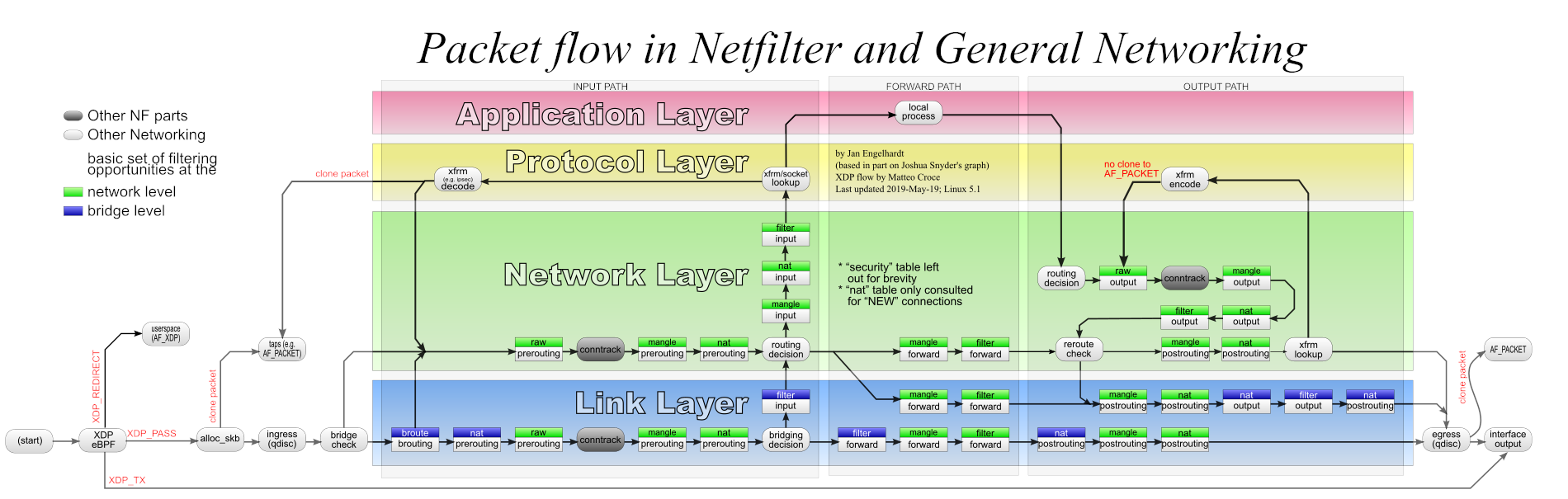
Source: thermalcircle.de
You can read more on honeypots at Wikipedia and the Linux Netfilter project.
¶ Editing the NFT ACL Files
There are three ACL files that control the honeypot. You can safely modify any of them; the structure of the honeypot’s NFT rules themselves shouldn’t normally need to be touched.
- /etc/nftables.d/honeypot-acl.nft — the TCP and UDP port lists the honeypot watches. Nothing else; the trusted-host list used to live here too and no longer does.
- /etc/nftables.d/goodactors-acl.nft — the one trusted list. Addresses here are accepted outright on both bridge legs, so they bypass the block list and live CrowdSec bans and never reach the honeypot rules, which means a trusted host can no longer generate the evidence that would get it banned.
- /etc/nftables.d/badactors-acl.nft — IPv4 and IPv6 addresses the honeypot will always ban.
The Firewall ACLs page in the admin interface is the preferred way to change these lists. It writes the same files and then applies the change immediately as a single atomic nftables transaction that updates only the affected lists — no reboot, and no interruption to the live CrowdSec bans. Editing a file by hand instead leaves the running ruleset untouched until the ruleset is reloaded or the device reboots.
If you do reload the whole ruleset by hand (
sudo nft -f /etc/nftables.conf), the live CrowdSec ban lists are emptied and are not automatically refilled — the component that feeds them only sends changes, not a full list. Restart it afterwards withsudo systemctl restart cs-firewall-bouncerand confirm withsudo systemctl is-active cs-firewall-bouncer, or the device will enforce nothing until it next restarts on its own.
Cross-check the port lists against your firewall’s port-forwarding (DNAT) rules. Any port you forward is a port something behind the bridge answers on, and the honeypot’s whole premise is that these ports are unused — it cannot tell a customer from a scanner. Forward a port that is still in the list and the first packet from every legitimate user bans that user, from every service on your network. Remove the port before deploying, and re-check whenever a forward is added. HINT: for SMTP specifically, running over TLS on 465 (SMTPS) or 587 (submission) avoids the problem entirely — neither is in the honeypot list.
~$ sudo nano /etc/nftables.d/honeypot-acl.nft
# Scanned ports used in honeypot blocking
# TCP Most Common Ports
define tcp-scanports={ 20-21, 22, 23, 25, 445, 1433-1434, 3128, 3306, 3389, 5985-5986, 8291 }

# UDP Most Common Ports
define udp-scanports={ 69, 135-139, 161 }
~$ sudo nano /etc/nftables.d/goodactors-acl.nft
# Allowed Lists (Good actors)
#
# IPv4
# Most Common Routers, then public DNS resolvers
define goodacl4 = { 192.168.0.0/16, 1.1.1.1, 1.0.0.1, 8.8.8.8, 8.8.4.4, 9.9.9.9 }

# IPv6
# Link Local addresses, then public DNS resolvers
define goodacl6 = { fe80::/10, 2606:4700:4700::1111, 2606:4700:4700::1001, 2607:f8b0:400a:80b::2003, 2620:fe::10 }
The public resolvers shown here were previously held in a second, honeypot-only trusted list. There is now one list, because two lists meaning the same thing drifted: a host could be trusted by one and still reported by the other.
Prefixes are allowed, and it is worth being deliberate about them — every entry is exempt from enforcement for as long as it is listed, so a prefix exempts that whole range. Keep the list to what you actually trust.
~$ sudo nano /etc/nftables.d/badactors-acl.nft
# Block Lists
# Addresses that are always blocked (Bad actors)
#
# IPv4 Bad actors
define badacl4 = { 10.10.10.10 }

# IPv6 Bad actors
define badacl6 = { f000::/64 }
The honeypot rules themselves aren’t intended for user editing — they’re shipped by awesome-o-base and replaced on firmware update. Included here so you can see where your ACL entries are actually consulted.
The honeypot is a chain inside the main protection table, not a table of its own. That matters: it is reached only after the trusted, blocked and banned checks have all been passed, so a host on the trusted list never reaches it and never produces evidence against itself.
table inet crowdsec-ip4 {
        # Trusted / blocked / banned lists and the scan-port sets are
        # declared here, in this same table -- a list can only be read
        # by rules in the table that declares it.

        chain check-wan4 {
                ip saddr @good-actors4 jump pass-src
                ip saddr @bad-actors4 jump drop-in-actor
                ip saddr @crowdsec-blacklists4 jump drop-in4
                jump honeypot-ip4
        }

        chain honeypot-ip4 {
                tcp dport @tcp-scan-ports update @honeypot-rate4-tcp { ip saddr limit rate 12/minute } counter log prefix "TCP4 honeypot:" group 2
                udp dport @udp-scan-ports update @honeypot-rate4-udp { ip saddr limit rate 12/minute } counter log prefix "UDP4 honeypot:" group 2
        }
}
Two details worth knowing when reading your own logs:
- The rate limit is per source address, 12 log lines a minute. A single host hammering one port produces evidence at that rate, not once per packet — so the log is a sample of a scan, not a complete packet record.
- The honeypot only reports. It issues no block of its own; it writes evidence that CrowdSec reads, and CrowdSec is what decides to ban. That’s why a ban carries an expiry and shows up in the dashboards rather than vanishing into the ruleset.
Earlier firmware ran the honeypot as a separate
table inet honeypot. It was merged into the main table because a separate table could not read the trusted list at all — lists belong to the table that declares them — and because accepting a trusted host in one table does not stop it being examined by another. The result was that a trusted host logged evidence against itself, got banned, and the ban then sat unenforced because the trusted list is checked first. If you are following older notes that mentiontable inet honeypot,banexempt4orbanexempt6, they describe firmware that no longer ships.
¶ Editing the CrowdSec Parser and Scenario
The CrowdSec parser turns raw honeypot log lines into structured events; the scenario decides when an offender has crossed the line and a decision should be issued. Both live in mounted volumes on the CrowdSec container.
You should only attempt this if you have a good knowledge of REGEX, GROK, and CrowdSec parsers and scenarios. Edit at your own risk. Always back up the original files and test your edits first. CrowdSec has a built-in testing utility for parsers and scenarios — see cscli explain.
The two files:
/opt/deploy/crowdsec/config/parsers/honeypot-ban.yaml/opt/deploy/crowdsec/config/scenarios/honeypot-bf.yaml
Editing either of these files requires a restart of the CrowdSec container to take effect.
¶ Restarting the CrowdSec container
admin@defend-o-tron:~$ sudo do-stacks rm crowdsec
[Container gets stopped]
admin@defend-o-tron:~$ sudo do-stacks
~$ sudo nano /opt/deploy/crowdsec/config/parsers/honeypot-ban.yaml
name: awesomeo/honeypot-banlog
description: "Parses inbound ban logs from the honeypot mangle rules"
author: "Awesome-O Gadgets"
format: 2.0
debug: false
filter: "evt.Parsed.message contains 'honeypot'"
onsuccess: next_stage
pattern_syntax:
  TSTAMP: '%{TIMESTAMP_ISO8601:timestamp}'
  HOSTNAME: '%{WORD:log_host}'
  HONEY_MAC: 'MAC=%{MAC:srcmac}:%{DATA}:%{MAC:dstmac}:%{DATA}'
  HONEY_BAN_BASE_LOG: '%{WORD:ban_type} honeypot: IN=%{WORD:iface} OUT=?(%{DATA:iface_out}) %{HONEY_MAC} SRC=%{IP:src_ip} DST=%{IP:dst_ip} LEN=%{DATA:len} %{GREEDYDATA} PROTO=%{WORD>
nodes:
  - grok:
      apply_on: message
      pattern: '%{HONEY_BAN_BASE_LOG} URGP'
      statics:
        - meta: log_type
          value: honeypot
  - grok:
      apply_on: message
      pattern: ': %{HONEY_BAN_BASE_LOG} SEQ=%{INT:seq}'
      statics:
        - meta: log_type
          value: honeypot

statics:
  - meta: service
    value: honeypot_banlog
  - meta: state_type
    expression: evt.Parsed.state
  - meta: log_host
    expression: evt.Meta.machine
  - meta: ban_type
    expression: evt.Parsed.ban_type
  - meta: ban_protocol
    expression: evt.Parsed.proto
  - meta: ban_port
~$ sudo nano /opt/deploy/crowdsec/config/scenarios/honeypot-bf.yaml
type: trigger
name: awesomeo/honeypot-bf
description: "Detect bruteforce connection attempts from honeypot mangle rules"
author: 'Awesome-O Gadgets'
version: '1.0'
format: 2.0
debug: false
filter: |
    (evt.Meta.log_type == 'honeypot' and evt.Meta.service == 'honeypot_banlog')
distinct: evt.Meta.ban_type
groupby: "evt.Meta.source_ip + '-' + Lower(evt.Meta.ban_protocol + '-' + evt.Meta.ban_type)"
blackhole: 1m
labels:
  behavior: "generic:bruteforce"
  label: "Honeypot bruteforce scan"
  confidence: 3
  spoofable: 0
  classification:
    - attack.T1595
    - attack.T1110
  service: honeypot-bf
  type: bruteforce
  remediation: true
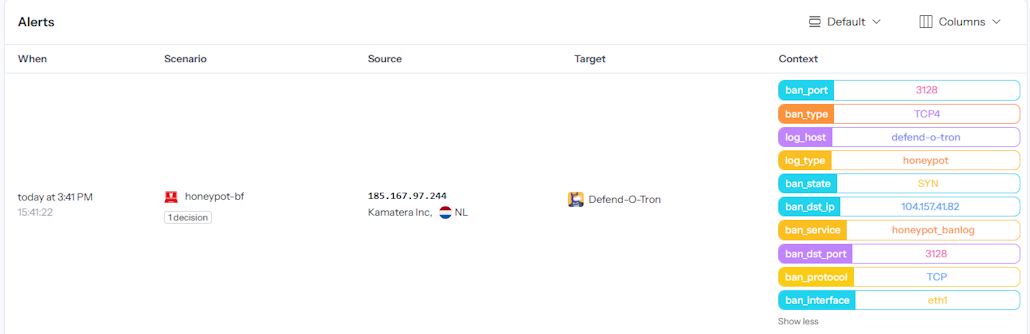
¶ Honeypot Context Data
The column on the right shows the metadata added from the honeypot rules, as seen on the Crowdsec App dashboard.
¶ Regex and GROK Reference
¶ Regular Expressions (Regex)
Regular Expressions (regex / regexp) are extremely powerful for searching and manipulating text strings — a single regex line can easily replace dozens of lines of procedural code. The language takes time to master and can cause serious side effects when used carelessly (notable real-world example).
¶ GROK
GROK is a regex dialect that supports reusable aliased patterns. GROK works particularly well with syslog logs, Apache and other webserver logs, MySQL logs, and any log format written for humans rather than computers. CrowdSec uses GROK throughout its parser library — including the honeypot parser shown above.
¶ Related Pages
- Honeypot — user-facing overview of what the honeypot does and how to handle false positives.
- External Log Ingress — the syslog architecture that feeds CrowdSec.
- CrowdSec API — remote bouncer setup using the same threat decisions the honeypot produces.